Contents
Chapter 00
How a loan works, from start to finish
The loan agreement you sign is what governs your loan. This guide explains how to use the website; where the two ever differ, your signed agreement prevails.
Read this chapter first. The rest of the guide explains one screen at a time, but a loan crosses several screens, and it is much easier to find your way once you know the shape of the whole journey.
Section 01
The short version
Open an account
your IC number, a phone number you can receive SMS on, and an email address. Both the phone and the email are verified with a code before the account is created.
Fill in the application
six steps, about ten minutes.
We review it
you do not need to do anything while this is happening. If we need something more from you, your dashboard says so.
We approve or decline
if approved, your dashboard asks you to sign the agreement.
The money is released
and your repayment schedule appears in your account.
Section 02
Where you are told what to do
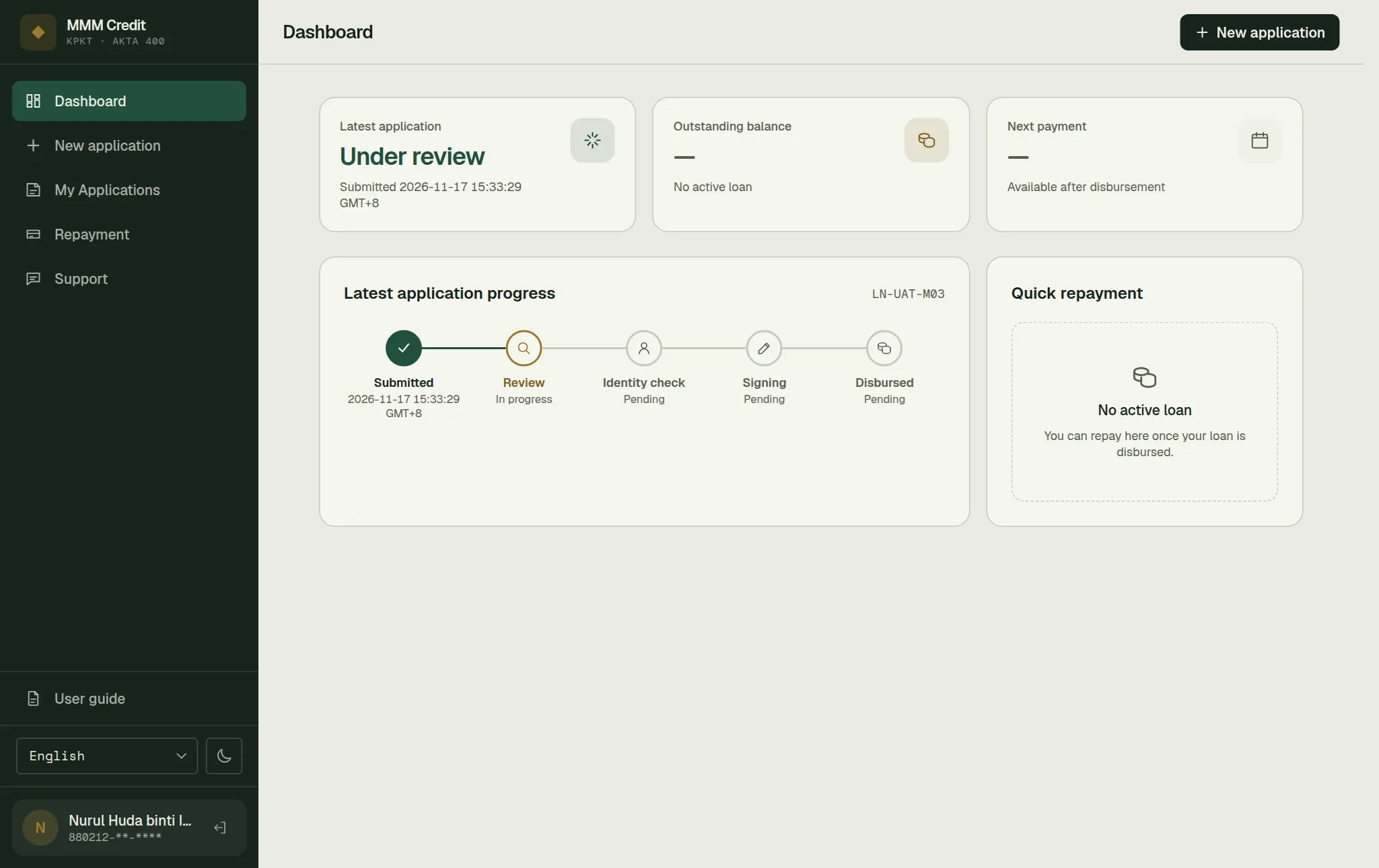
Everything you need to act on appears on your Dashboard — the first page you see after logging in. You do not have to check your email or wait for a phone call to find out where things stand.
The dashboard shows a progress bar with five steps:
| Step | What it means |
|---|---|
| Submitted | We have your application. |
| Review | Our team is assessing it. Nothing for you to do. |
| Identity check | We confirm you are who you say you are. |
| Signing | The agreement is prepared, signed by you, by us and by a witness, and then stamped at LHDN. |
| Disbursed | The money has been released. |
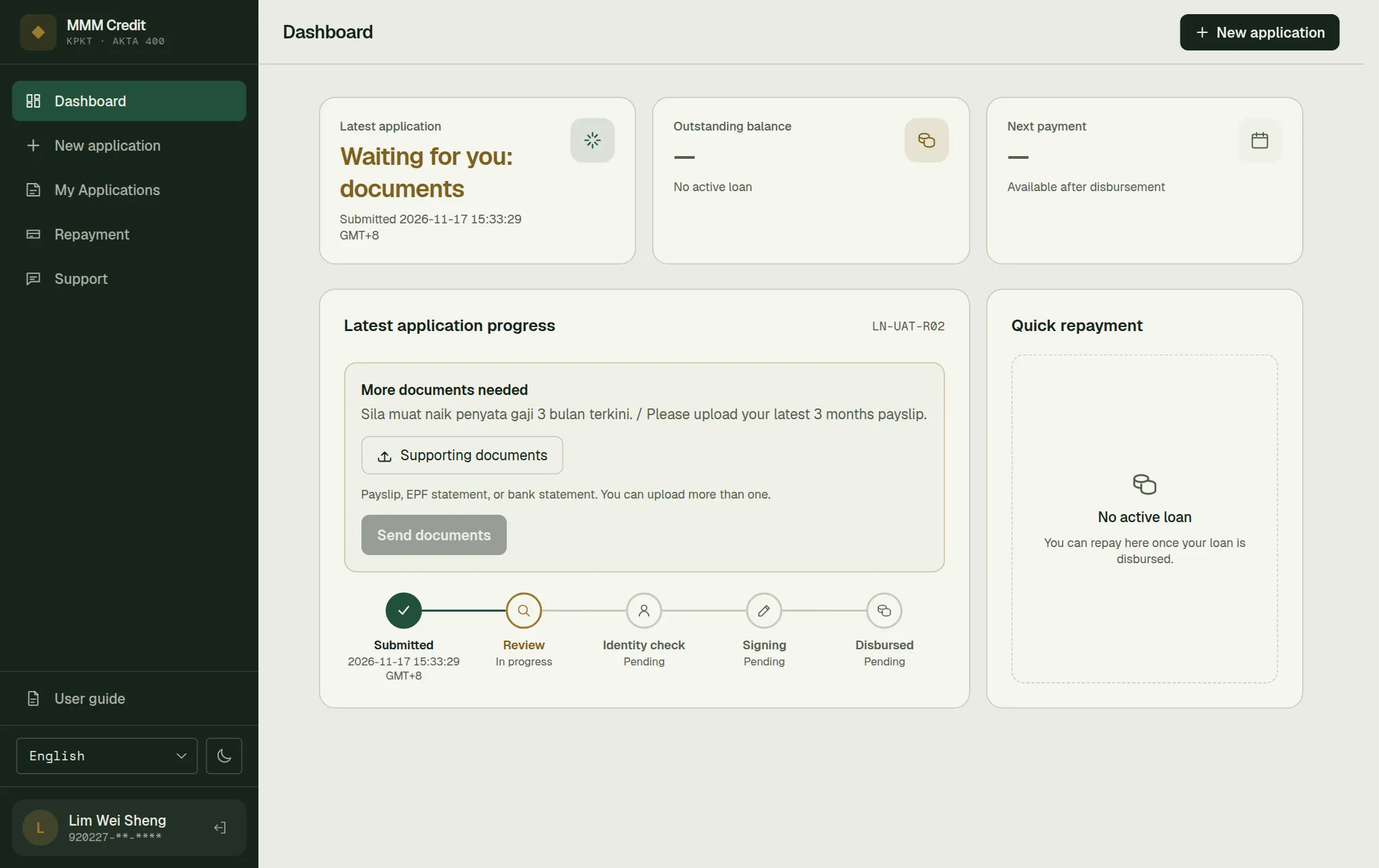
Three things can interrupt this, and all three put the ball in your court. A panel appears on your dashboard and says so plainly:
- "Waiting for you: documents" — a reviewer has asked for something specific, such as a payslip or a bank statement. Their reason to you is shown on the dashboard, and you upload the files right there.
- "Waiting for you: identity check" — see chapter 7.
- "Waiting for you: sign your loan agreement" — your agreement is ready for your signature. Press Sign agreement and see chapter 11.
If none of these is showing, we are working on it and you do not need to do anything.
Section 03
What we ask of you, and when
The order is deliberate, so you are never asked for more than the next step needs.
| When | What we ask for | Why then |
|---|---|---|
| Registering | IC, name, phone, email, a password, accepting our Terms and Conditions, and a code sent to your phone and one sent to your email | The least we need to open an account for you, and a reliable way to reach you — support replies and account notices go to that email |
| Before applying, only if your email is not yet verified | A verified email address | Only accounts created by our staff, or opened before registration verified the email, can be in this position |
| In the application | Employment, income, address, bank account, MyKad photos, supporting documents | What is needed to assess the loan |
| After approval | Signing the agreement | The law requires a witnessed, signed agreement |
Section 04
One application at a time — but more than one loan
You can only have one application in progress, and an application that has been approved but not yet disbursed still counts as in progress. If you try to start a second, the site tells you so and points you back to your account. Once the application is declined, closed or disbursed, you can apply again.
After a loan is disbursed there is a short wait before you can start the next application. If you try during that time, the page tells you the date from which you can apply again.
You can be repaying more than one loan at the same time. Each loan keeps its own schedule — see chapter 8.
Section 05
If something looks wrong
Every screen in your account shows only your own information. If a screen is blank, showing an error, or showing something you do not recognise, do not keep going — open a ticket under Support and tell us what you saw and roughly when. Do not send your password to anyone, including us. We will never ask you for it.
Still stuck?
Talk to us.
Use the Contact Us form. If you have an account, log in and open a ticket under Support in your account: our replies stay on the ticket.
Never put your password or a verification code in a message or a ticket. Our team will never ask you for it.